Liminal Dreamcore Look: Hazy Retro Video Recipe
The Liminal Dreamcore look channels the disorienting feeling of wandering through a fluorescent-lit hotel corridor or deserted playground in the dead of night. By pairing gentle wave undulation with faded tape warmth, residual ghosting, and softened chromatic separation, this aesthetic transforms everyday footage into a half-forgotten memory suspended somewhere between comfort and mild existential dread.
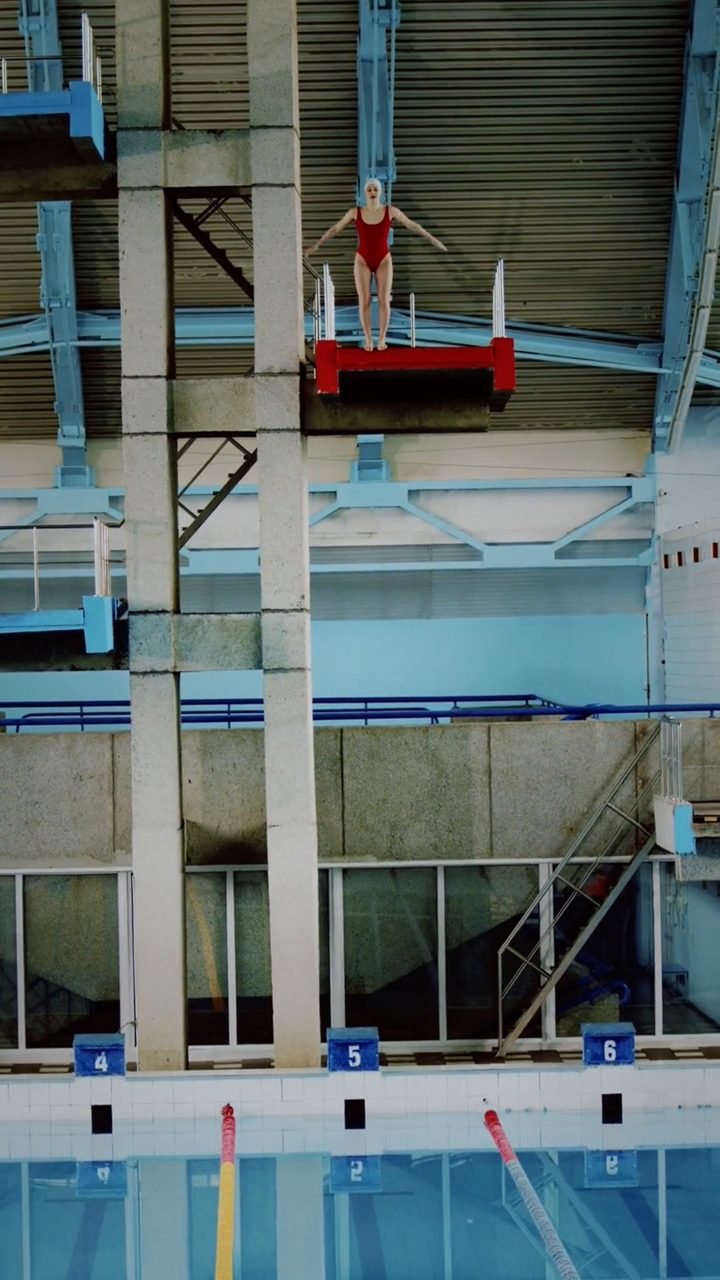 BEFORE
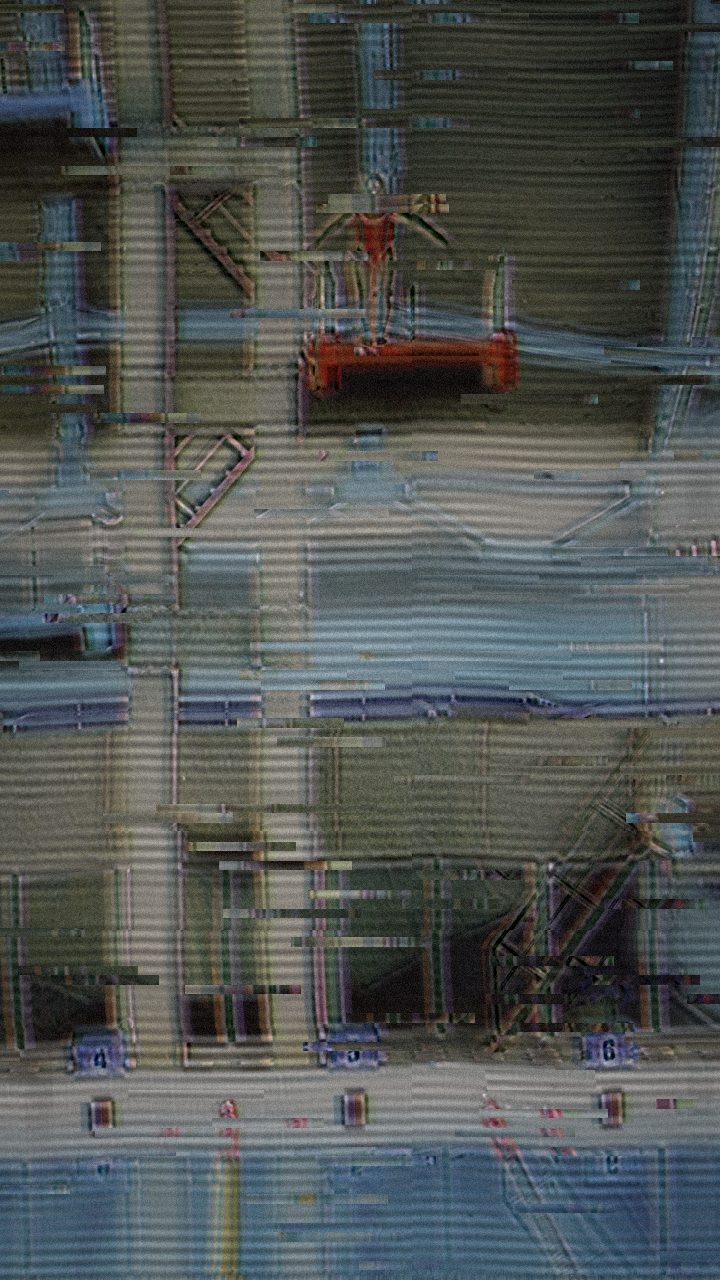 AFTER
Why this look works
The hypnotic core of this look relies on a delicate balance between rhythmic warping and chromatic diffusion. Horizontal and Vertical Wave controls work together to introduce a slow, liquid breathing motion, making rigid architecture feel unstable and alive. When layered beneath a subtle touch of Datamosh, moving edges leave faint lingering echoes that simulate visual persistence, as if the camera sensor itself is struggling to retain the scene.
Balancing Drift Against Destructive Glitch
Rather than relying on violent data spikes, this recipe leans heavily into analog wear. Moderate Scanlines and RGB Split simulate an unshielded CRT tube losing beam calibration, casting soft magenta and cyan halos around high-contrast edges. A touch of Sepia pulls raw digital primaries toward faded photographic print paper, while Color Boost ensures the underlying midtones retain enough saturation to avoid collapsing into flat gray mud.
Restraint is essential here. Pushing Glitch Rate or Chaos past their sweet spots instantly shifts the mood from eerie nostalgia into an aggressive digital malfunction. By keeping structural glitching low and prioritizing analog drift, the viewer's attention stays locked on the uncanny stillness of the environment.
The recipe
Start from the VHS preset, then set:
| Retro (era) | 1989 |
| Strength (master) | 46 |
| Glitch Rate | 18 |
| Glitch Width | 24 |
| Block Size | 40 |
| Chaos | 34 |
| Datamosh (trail) | 14 |
| Horizontal Wave | 30 |
| Vertical Wave | 20 |
| Vertical Shift | 10 |
| Vertical Shake | 12 |
| RGB Split | 46 |
| Hue Shift | 7 |
| Color Boost | 40 |
| Sepia | 24 |
| Noise | 30 |
| Scanlines | 44 |
| Flicker | 20 |
Everything else stays at its default — tweak it, then copy your own look as JSON or a link from inside the editor to share it.
What footage suits it
Dreamcore aesthetics depend on an eerie sense of isolation, making your choice of source clip far more influential than the effect stack alone.
- Empty, enclosed architectural spaces like carpeted hotel hallways, indoor pools, unfurnished rooms, or stairwells.
- Outdoor locations at dusk or night with single, unnatural light sources such as streetlamps or neon storefronts.
- Slow, methodical tracking shots, pans, or fixed tripod compositions that give subtle distortions time to ripple across the frame.
Avoid chaotic handheld clips, rapid montage cuts, or brightly lit outdoor daylight scenes, as rapid action shatters the hypnotic, suspended-in-time quality.
Common mistakes
- The screen shatters into harsh, modern digital artifacts: Chaos is set too high—reduce Chaos to smooth out the micro-distortions back into organic tape noise.
- The visual pulse feels too aggressive and distracting: Glitch Rate is firing too frequently—lower Glitch Rate so the frame settles into a tranquil, eerie rhythm.
- The picture looks bleached or completely washed out: Sepia is suppressing all natural tones—raise Color Boost or ease back on Sepia to restore faint, haunting pastel hues.
When to use it
Because it creates a quiet sense of unreality, this look is exceptionally versatile for non-traditional visual storytelling:
- Backrooms, poolcore, and weirdcore short-form narratives where familiarity breeds subtle unease.
- Looping visual backdrops for ambient music, lo-fi beats, vaporwave, or dark ambient tracks.
- Analog horror transitional cutaways and faux vintage surveillance sequences.
- Nostalgic social media edits capturing forgotten childhood spaces or quiet late-night commutes.
To dive deeper into the conceptual foundation of these aesthetics, read our walkthrough on How to Make a Dreamcore / Weirdcore Edit for Free. When you are ready to craft your scene, launch the editor, drop in an empty space recording, and fine-tune Horizontal Wave until the frame begins to gently float.
Try it now — add this look to your own clip, free and in your browser.
Open the editor →FAQ
Why use Datamosh in a dreamcore look if datamoshing is usually harsh?
At conservative values, Datamosh creates a persistent memory smear rather than an abrasive codec tear, lending moving objects an ethereal ghosting quality.
How do I make the aesthetic feel even more like worn magnetic tape?
Nudge Retro slightly further back in time and gently increase Noise to emulate analog head wear without introducing distracting digital compression artifacts.
Does this setup work on vertical mobile footage?
Yes, though 9:16 aspect ratios exaggerate Vertical Wave and Vertical Shake, meaning you may want to temper those two sliders slightly if the frame bounces too high.