Broken Monitor Glitch Effect: Dying Screen Look Recipe
The Broken Monitor look simulates a dying cathode-ray tube or damaged LCD panel desperately fighting to hold a coherent picture. By blending dense scanline rasterization with vertical sync slippage, unstable chromatic fringing, and harsh power flicker, this recipe creates an unsettling, high-voltage breakdown that makes digital media feel fragile, tactile, and dangerously close to total failure.
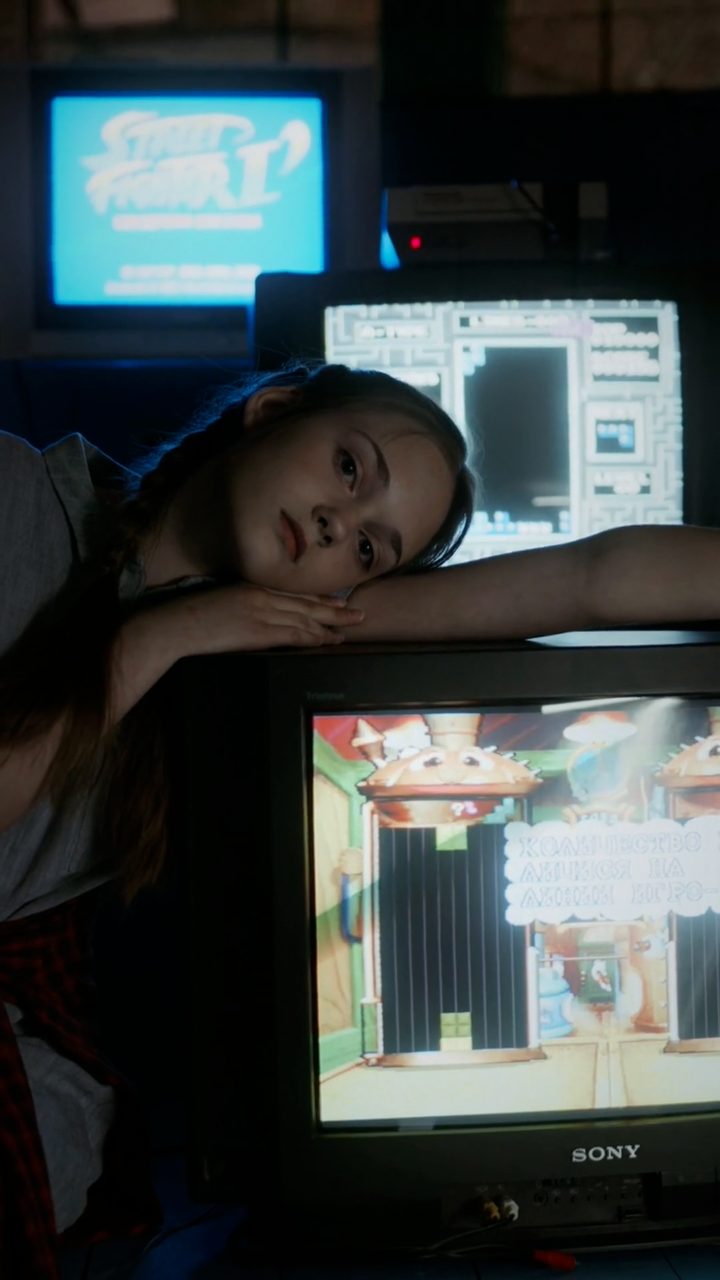 BEFORE
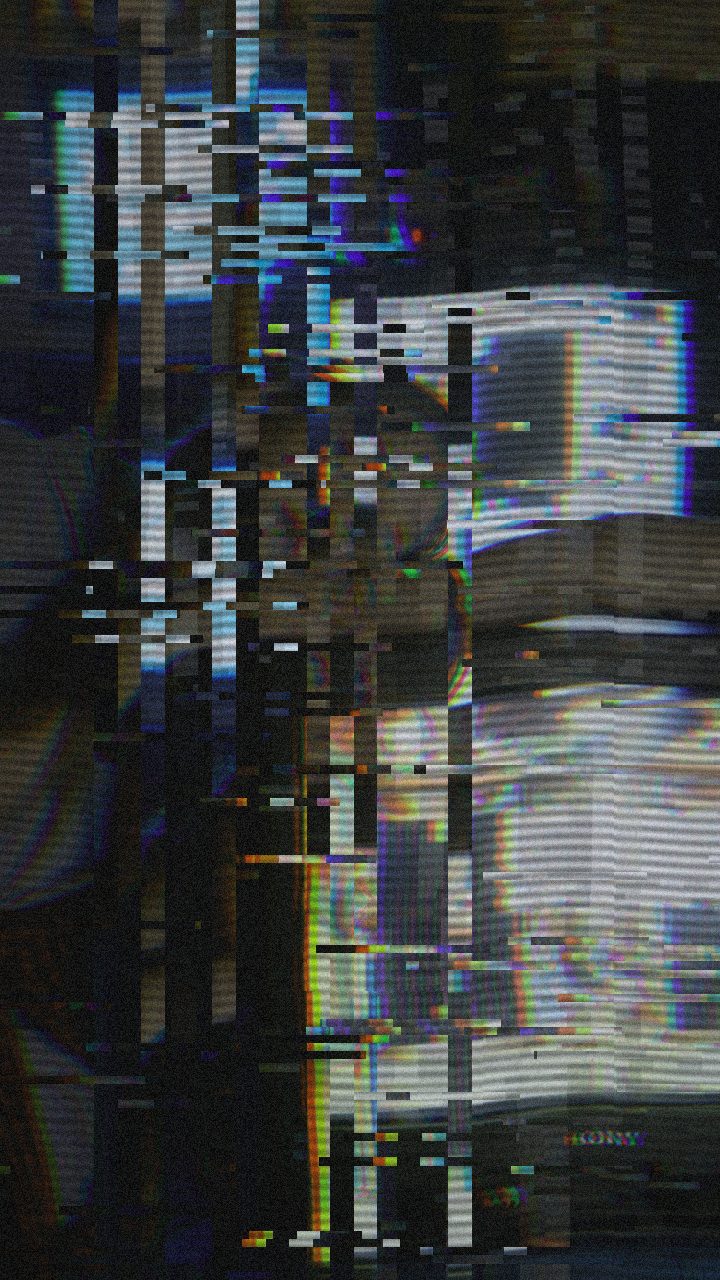 AFTER
AFTERWhy this look works
The structural instability of this look is driven by the interplay between Vertical Shift, Vertical Shake, and Horizontal Wave. Together, they mimic a display whose internal sync generator is failing, causing the image to roll and shudder as if the electron beam cannot find its starting line. Horizontal warping adds a subtle elastic ripple across the scan path, selling the feeling of hardware under electrical strain.
Raster Texture and Chromatic Misalignment
Heavy Scanlines and medium Noise establish the physical grit of the display surface, grounding the effect so it feels like a tangible screen rather than a software overlay. Meanwhile, RGB Split pulls the color channels apart like misaligned electron guns, introducing harsh magenta and cyan fringes along every high-contrast edge.
Flicker acts as the heartbeat of the malfunction, introducing irregular brightness dips that simulate fluctuating voltage. Pushing Datamosh or Block Size too far will turn the effect into generic compression soup; keeping them restrained ensures the failure remains distinctly mechanical and screen-bound.
The recipe
Start from the Broken Monitor preset, then set:
| Strength (master) | 38 |
| Glitch Rate | 22 |
| Glitch Width | 30 |
| Block Size | 34 |
| Chaos | 26 |
| Datamosh (trail) | 22 |
| Horizontal Wave | 38 |
| Vertical Wave | 32 |
| Vertical Shift | 46 |
| Vertical Shake | 34 |
| RGB Split | 44 |
| Hue Shift | 6 |
| Noise | 46 |
| Scanlines | 80 |
| Flicker | 46 |
Everything else stays at its default — tweak it, then copy your own look as JSON or a link from inside the editor to share it.
What footage suits it
This preset delivers the highest impact when applied to footage featuring sharp contrast and clear silhouettes, giving the sync errors crisp edges to tear apart:
- High-contrast UI graphics and HUDs: Terminal text, digital meters, wireframes, and warning dialogs react dramatically to channel separation and line rastering.
- Dark sci-fi or urban scenes: Deep shadows let the bright scanline texture and RGB fringes pop with neon-like intensity.
- Direct-to-camera portraits: Close-up faces framed against simple backgrounds gain an immediate sense of distress or psychological tension.
- Slow or locked-off camera shots: Controlled movement prevents the screen-tearing effects from turning into visual clutter.
Avoid washed-out, low-contrast daylight clips, as bright backgrounds flatten the scanline grid and mute the chromatic separation.
Common mistakes
- The image becomes a smear of liquefied pixels: Symptom of excessive frame data bleeding. Lower Datamosh to maintain sharp raster edges rather than soft compression artifacts.
- The strobing is excessively harsh on the eyes: Symptom of over-cranked light modulation. Reduce Flicker to establish a subtle electrical buzz instead of blinding strobe cuts.
- Key text or graphic elements are unreadable: Symptom of wide color channel displacement. Dial back RGB Split so the fringes frame your typography rather than duplicating entire words across the frame.
When to use it
The Broken Monitor recipe is a versatile tool whenever a narrative or visual design requires sudden technological failure:
- Diegetic error screens and terminals: Give in-world security consoles, spaceship cockpits, or hacked computers a convincing sense of physical destruction.
- Music video glitch drops: Snap into extreme monitor instability precisely on beat drops, heavy bass hits, or harsh vocal transitions.
- Analog horror and cyber-thrillers: Build atmospheric tension during critical story reveals, making footage look like a degraded transmission recovered from damaged equipment.
- High-energy title cards: Apply the recipe to logos or motion graphics for an aggressive, industrial introduction.
Load your asset into the editor to test the preset instantly, and explore The Best Way to Add a Glitch Effect Online in 2026 to learn how to layer these effects across full video timelines.
Try it now — add this look to your own clip, free and in your browser.
Open the editor →FAQ
How do I make the monitor look like it is losing vertical sync completely?
Increase the Vertical Shift and Vertical Shake parameters to force the image frame to continuously roll and shudder out of vertical alignment.
Why are the scanlines overpowering the underlying footage?
Lower the Scanlines slider slightly or decrease master Strength so the dense horizontal raster lines do not completely crush your subject details.
Can I make the glitch feel more mechanical rather than digital?
Dial back Datamosh and Block Size while keeping Horizontal Wave, Vertical Shake, and Noise elevated to simulate hardware cathode failure.