Cyberpunk Neon Look: Futuristic Glitch Video Recipe
The Cyberpunk Neon look captures the raw electricity of a rainy dystopian megalopolis, wrapping your clips in saturated synth hues, fractured optics, and high-frequency digital interference. Built around high-energy color warping and surgical horizontal displacement, it turns ordinary night footage into an imposing, high-tech holographic transmission flashing across wet pavement and skyscraper glass.
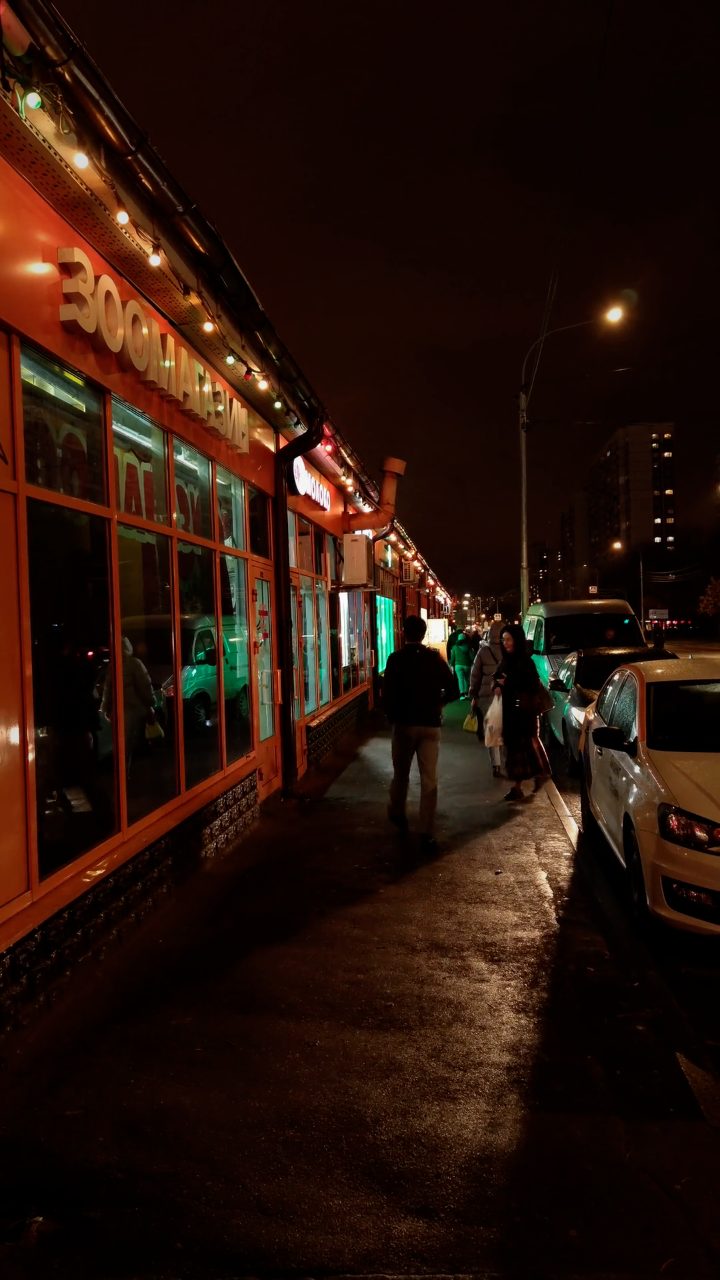 BEFORE
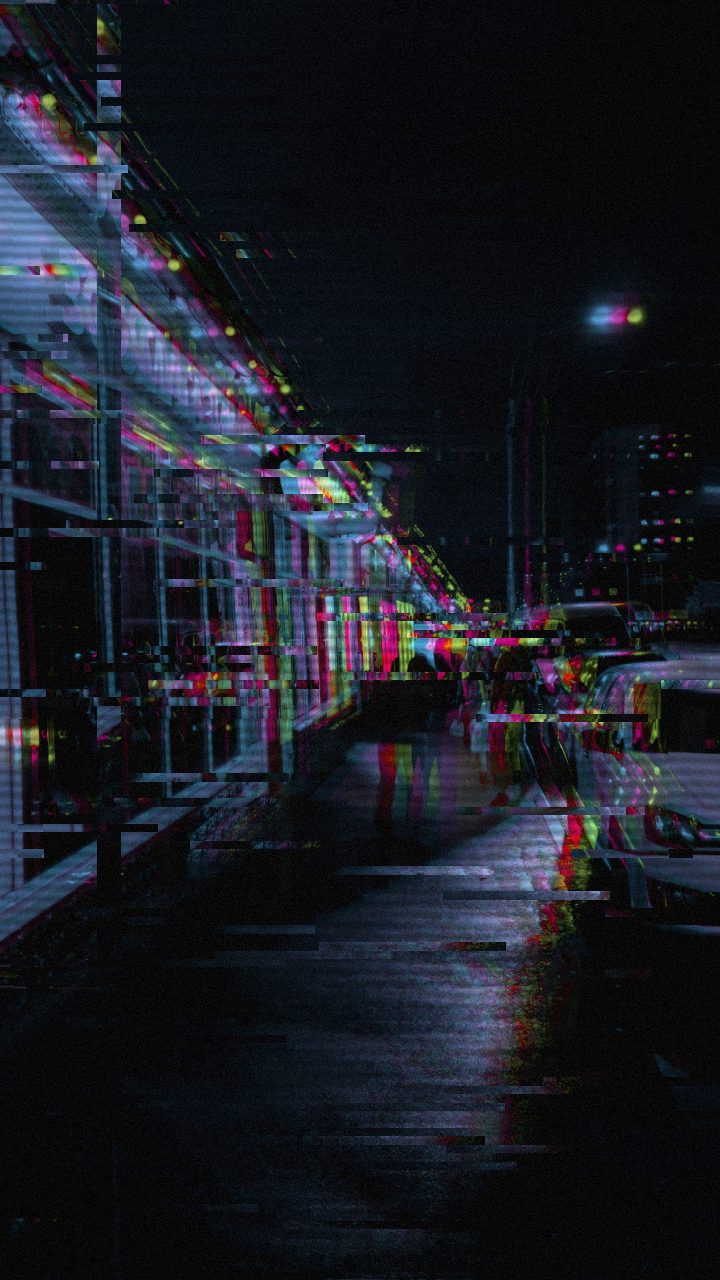 AFTER
AFTERWhy this look works
The core engine of this recipe is the synergy between optical separation and chromatic grade. Dramatic RGB Split tears the edges of bright highlights away from their shadows, casting brilliant magenta and cyan fringe halos across every silhouette. Elevating Color Boost and Hue Shift pushes those separated channels into an overdriven, saturated register that mimics neon tube lighting reflecting off damp urban surfaces, while keeping master Strength tempered ensures the underlying footage remains recognizable.
Tactile screen texture prevents the digital color grade from looking sterile. A tight layer of Scanlines and subtle Noise etches an authentic CRT monitor raster into the frame, providing structural grain that softens aggressive digital lines. Low-level Datamosh motion trails and minor Horizontal Waves introduce fluid, frame-dragging motion, simulating an unstable live feed beamed across an overloaded network. If you push Chaos or Glitch Width too high, however, the crisp cyberpunk architecture collapses into unreadable digital soup.
The recipe
Start from the Cyber Glitch preset, then set:
| Strength (master) | 30 |
| Glitch Rate | 18 |
| Glitch Width | 30 |
| Block Size | 32 |
| Chaos | 20 |
| Datamosh (trail) | 8 |
| Horizontal Wave | 26 |
| Vertical Wave | 14 |
| Vertical Shift | 16 |
| Vertical Shake | 12 |
| RGB Split | 80 |
| Hue Shift | 56 |
| Color Boost | 58 |
| Contrast | 56 |
| Noise | 20 |
| Scanlines | 46 |
| Flicker | 14 |
Everything else stays at its default — tweak it, then copy your own look as JSON or a link from inside the editor to share it.
What footage suits it
This aesthetic thrives when feeding on stark light-dark separation and artificial illumination:
- High-contrast night cityscapes: Street-level clips featuring wet asphalt, neon signboards, or vehicle headlights produce maximum chromatic fringe separation.
- Silhouetted character portraits: Backlit subjects or side-lit profiles allow edge distortion to frame the subject without obscuring facial expressions.
- Reflective surfaces and hardware: Polished chrome, rain puddles, wet glass, and mechanical gear amplify the shifting color channels and scanning textures.
Avoid flatly lit daytime shots or washed-out, pastel scenes, as aggressive color boosting will turn low-contrast midtones into harsh, muddy banding.
Common mistakes
- Text or logos become completely illegible: The color channels have drifted past readable limits; pull back RGB Split until sharp letter edges reappear without losing their neon fringe.
- Frame turns into an indistinct smear of muddy colors: Excessive motion memory is washing out edge definition; reduce Datamosh until ghosting trails dissolve swiftly behind movement.
- The digital tear feels too frantic and distracting: Horizontal slivers are cutting across key subjects too rapidly; lower Glitch Rate to space out the transmission dropouts.
When to use it
The Cyberpunk Neon aesthetic is built for bold sci-fi branding and atmospheric visual identity across digital media:
- Gaming thumbnails and stream overlays: Cut through crowded feeds with electrified cyan and magenta accents that immediately signal futuristic gameplay.
- Hardware and tech reveal promos: Add an edgy, rogue-prototype aesthetic to product mockups, PC builds, or synthesized audio trailers.
- Sci-fi title cards and music video backdrops: Give cinematic titles the degraded urgency of an intercepted corporate broadcast.
- Vaporwave and darksynth album visuals: Create atmospheric loops for digital releases that lean heavily into retro-futurist dystopia.
Drop your footage into the editor, select the Cyber Glitch preset chip, and fine-tune the knobs to lock in the atmosphere. For a deeper breakdown of applying this look across alternate source styles, check out our companion walkthrough on the Cyberpunk Neon Glitch Look Recipe for Video & Photo.
Try it now — add this look to your own clip, free and in your browser.
Open the editor →FAQ
Why does the footage look heavily tinted toward cyan and magenta?
The combination of aggressive RGB Split and Hue Shift offsets your primary color channels, forcing red and blue wavelengths to separate across sharp edges into classic synthwave hues.
How can I maintain text sharpness when applying this look to title cards?
Keep Block Size and Chaos modest so letterforms remain legible, relying on Scanlines and RGB Split rather than severe spatial displacement for the futuristic texture.
Can I use Cyberpunk Neon on daytime video clips?
While possible, daytime footage lacks the deep shadows needed for high-contrast neon fringes, often producing washed-out color grading rather than an electric, futuristic atmosphere.