Retro Game Console Look: 16-Bit Cartridge Video Recipe
The Retro Game Console look strips away the hyper-clean fidelity of modern digital video, plunging your frames straight into the golden cartridge era of the early nineties. By crushing fine gradients into hard raster tiles and clamping color ramps into punchy silicon steps, it transforms ordinary live-action footage into an unmistakable, playable arcade memory.
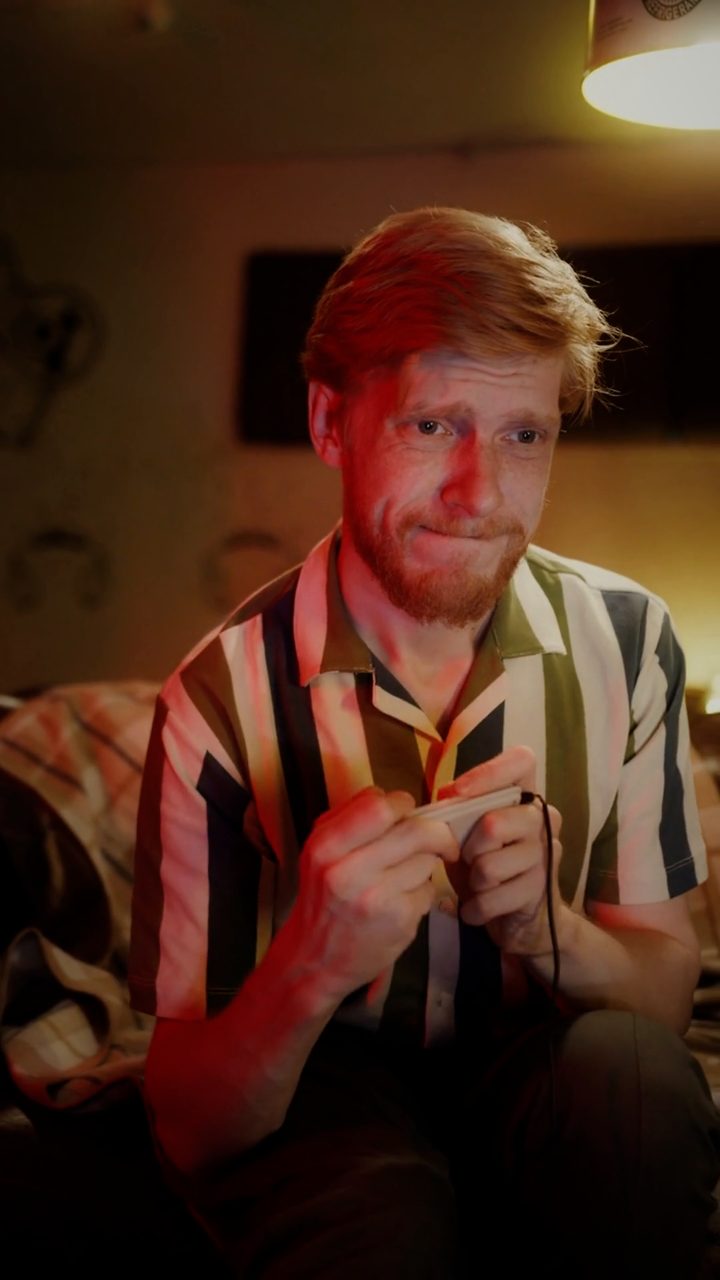 BEFORE
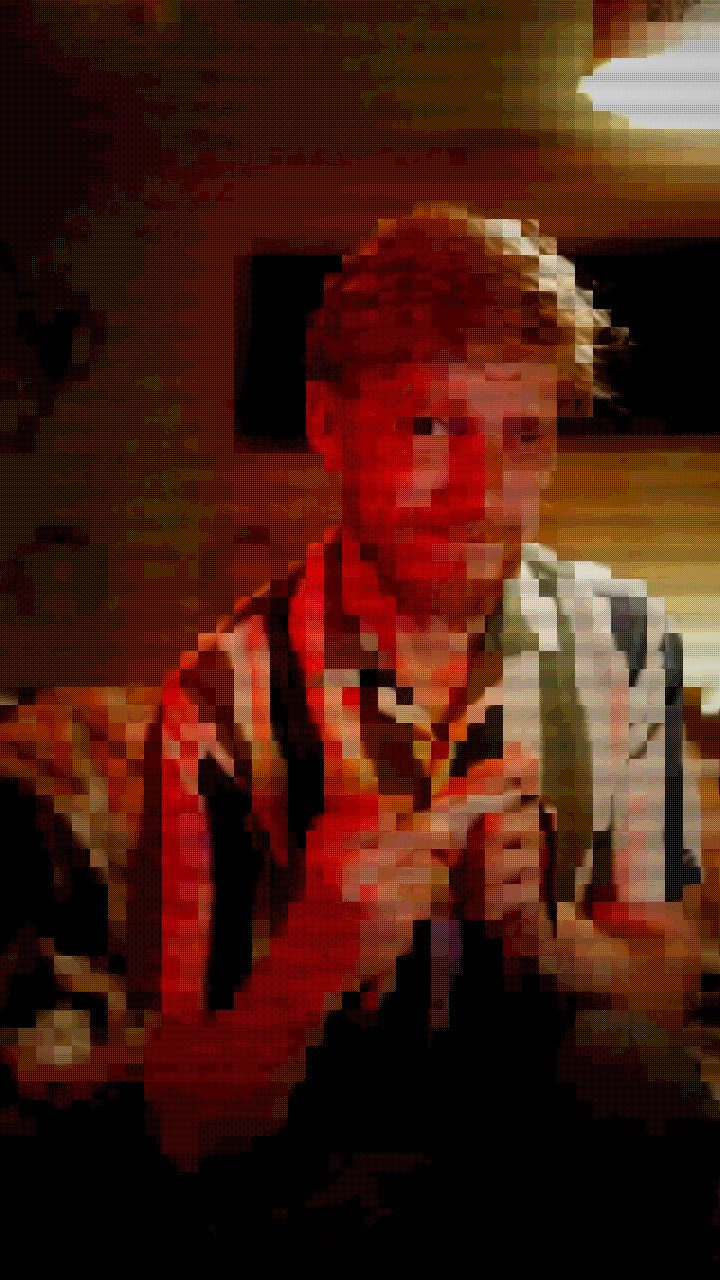 AFTER
Why this look works
Building the 16-Bit Aesthetic
The soul of this aesthetic rests on the tight interplay between resolution downsampling and palette quantisation. Pushing the pixelation threshold forces millions of smooth sub-pixels into oversized, grid-locked clusters, wiping out fine digital camera grain. Meanwhile, the retro palette processor forces continuous color ramps into a limited set of stepped color bands, mimicking the hardware limitations of custom graphics silicon from the cartridge era.
To make those stepped tiles pop rather than sink into dull midtone sludge, contrast and color saturation do the heavy lifting. Elevating the color saturation delivers the punchy, neon-bright energy of old platformer games, while heightened contrast preserves crisp edge separation between sprites and backgrounds. Overdriving the palette dial too far, however, can obliterate facial details into flat patches of single colors, so maintaining edge clarity is critical.
A balanced scanline layer ties the entire composite together. By etching subtle dark raster rows across the image, scanlines recreate the physical phosphor shadow mask of an illuminated cathode ray tube, softening the hard digital corners of the pixel clusters and sealing the vintage hardware illusion.
The recipe
Start from the Retro Game preset, then set:
| Color Boost | 50 |
| Brightness | 54 |
| Contrast | 62 |
| Scanlines | 24 |
| Pixelate | 64 |
| Retro Palette | 78 |
Everything else stays at its default — tweak it, then copy your own look as JSON or a link from inside the editor to share it.
What footage suits it
Source clips with clear silhouettes and bold visual separation yield the most authentic cartridge-grade conversions:
- High-contrast framing: Strong lighting with crisp separation between foreground subjects and background scenery prevents silhouettes from dissolving into the pixel grid.
- Punchy primary colors: Clips featuring rich reds, deep blues, and bright highlights give the palette quantizer distinctive color bands to latch onto.
- Readable, deliberate movement: Moderate pacing and clean physical gestures maintain structural clarity when downscaled, echoing retro character sprite animations.
- Medium and close-up angles: Tighter framing ensures facial expressions and key props remain recognizable once individual pixels swell in size.
Avoid dimly lit, low-contrast scenes or chaotic micro-textures, as extreme color quantisation will collapse dark regions into noisy, indistinct digital voids.
Common mistakes
- Featureless, posterized faces: The Retro Palette dial is pushed too high, collapsing nuanced skin tones into blotchy geometric patches; reduce Retro Palette until natural facial contours return.
- Milky, washed-out shadows: Contrast is set too low while Brightness is elevated, stripping the raster lines of their depth; increase Contrast to restore punchy black cutoffs.
- Unrecognizable subject shapes: Pixelate is set too high for the resolution of your clip, rendering essential details as an illegible mosaic; back down Pixelate until figures snap back into clean 16-bit definition.
When to use it
This crunchy, stylized aesthetic works brilliantly whenever you want to evoke nostalgia, playful gaming energy, or vintage tech charm:
- Gaming channel reels, TikTok cutdowns, and montage openers with a retro flair.
- Chiptune, synthwave, or lo-fi music video performance clips and visualizer loops.
- Twitch stream scenes, including BRB interstitials, starting-soon screens, and offline graphics.
- Title cards and stylized transitions for indie game development devlogs.
For an alternative approach to vintage hardware styling with softer raster dithering, explore our companion breakdown in the Retro Game Console Look Recipe: 16-Bit Pixel Style. When you are ready to craft your own custom cartridge visual, head into the editor and fine-tune your pixel grouping directly on your clips.
Try it now — add this look to your own clip, free and in your browser.
Open the editor →FAQ
Why does my footage turn into solid black and white blocks?
This occurs when contrast is pushed too aggressively against a heavy palette clamp. Pull back Contrast slightly or lower Retro Palette to restore intermediate color steps.
How do I make the pixelation look like a specific retro console?
Adjust the Pixelate knob to match your desired horizontal tile scale, then tweak Color Boost to mimic the oversaturated RGB video output of fourth-generation hardware.
Will the scanlines cause harsh moiré patterns on mobile screens?
To prevent aliasing against high-density phone displays, keep the Scanlines knob at a moderate setting so the raster rows softly integrate with the pixel blocks.