Vaporwave Sunset Look Recipe for Aesthetic Video & Edits
The Vaporwave Sunset look captures the dreamy, late-night nostalgia of a 1990s shopping mall bathed in neon twilight. By blending soft pastel color shifts with gentle CRT scanlines and subtle video sync slips, this recipe transforms clean digital clips into lush, lo-fi aesthetic dreamscapes effortlessly in your browser.
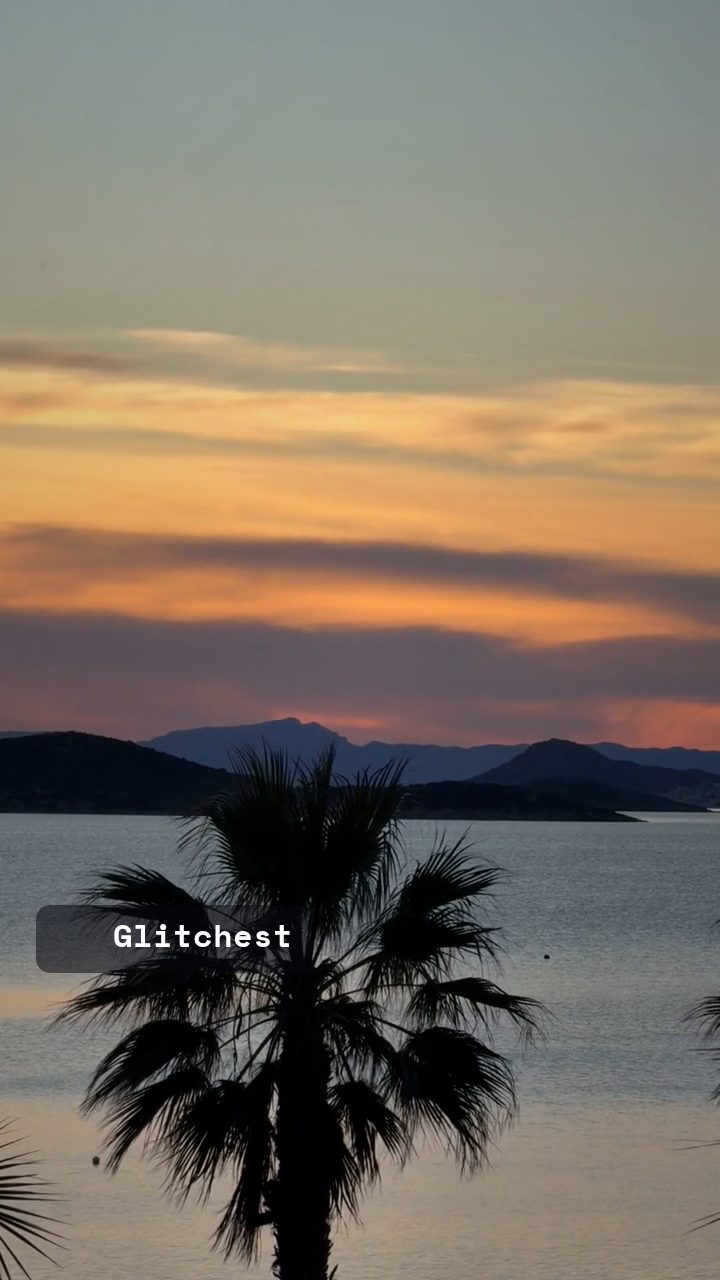 BEFORE
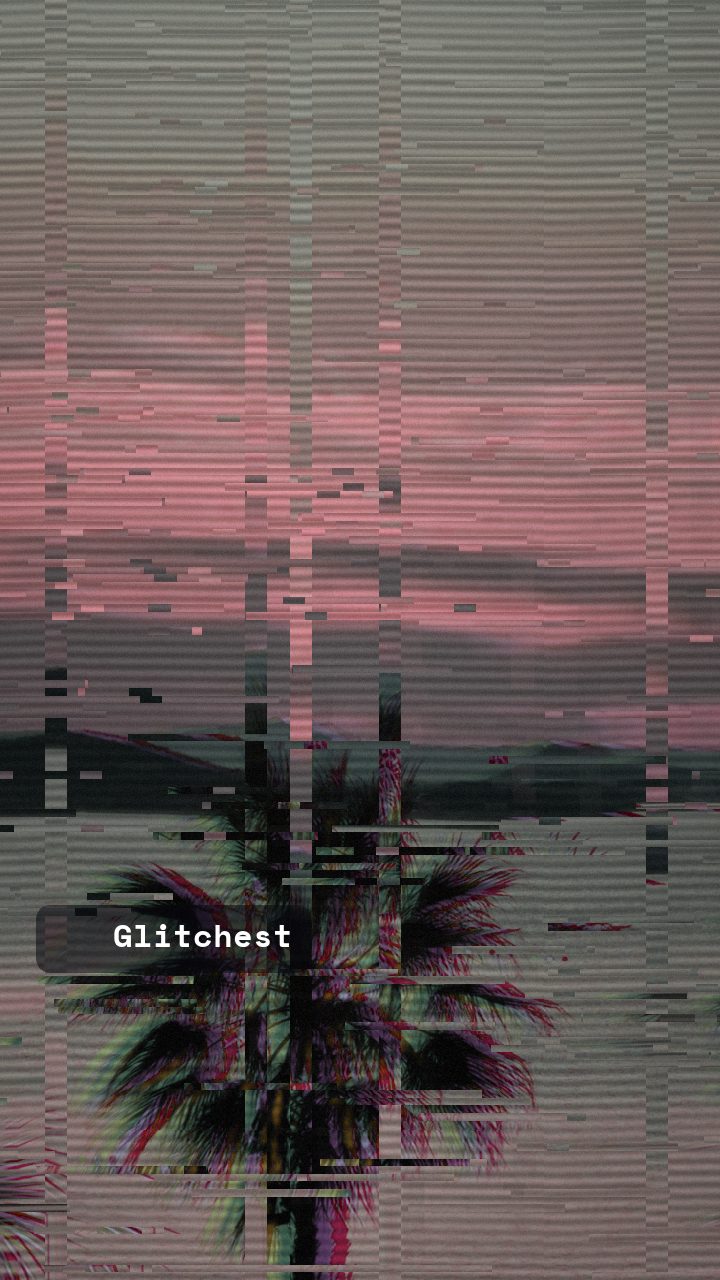 AFTER
AFTERWhy this look works
The Mechanics of Pastel Nostalgia
The heavy lifting in this look comes from the interplay between Hue Shift, Color Boost, and RGB Split. Shifting the hue pushes natural blues and reds into signature vaporwave tones like cyan, lavender, and electric pink. Color Boost amplifies these pastel hues without crushing shadows, while a generous RGB Split pulls the color channels apart along high-contrast edges to create an effortless optical prism effect.
Underneath the color science, atmospheric stability is provided by scanlines and a touch of sepia warm tone. Moderate scanlines introduce authentic CRT monitor texture, grounding the soft hues. Pushing Hue Shift or Color Boost too far will blow out highlights into solid neon blocks, whereas over-cranking Horizontal Wave will disrupt the smooth, meditative drift essential to chillwave visuals.
The recipe
Start from the Y2K preset, then set:
| Retro (era) | 1994 |
| Strength (master) | 42 |
| Glitch Rate | 22 |
| Glitch Width | 38 |
| Block Size | 24 |
| Chaos | 24 |
| Datamosh (trail) | 10 |
| Horizontal Wave | 18 |
| Vertical Wave | 8 |
| Vertical Shift | 17 |
| RGB Split | 66 |
| Hue Shift | 78 |
| Color Boost | 60 |
| Sepia | 20 |
| Noise | 14 |
| Scanlines | 48 |
| Flicker | 8 |
Everything else stays at its default — tweak it, then copy your own look as JSON or a link from inside the editor to share it.
What footage suits it
This aesthetic relies on smooth gradients and bright highlights to build its signature pastel glow. Choose source footage with the right baseline characteristics:
- Golden hour and twilight cityscapes: Existing sky gradients provide rich material for chromatic shifting.
- Slow, steady camera movement: Gentle pans and static shots allow the subtle horizontal waves to drift cleanly.
- Medium-to-high contrast subjects: Architecture, palm trees, and statues offer clean silhouettes against soft backgrounds.
- Soft ambient lighting: Diffused light creates smooth, liquid-like color transitions across the entire frame.
Avoid chaotic hand-held clips or overly dark nighttime footage with severe compression artifacts, as these break the serene, dreamy atmosphere.
Common mistakes
- Symptom: Harsh neon skin tones and blown-out highlights. Fix: Reduce the Color Boost knob down toward moderate levels or dial back Strength to restore highlight roll-off.
- Symptom: Violent image tearing that destroys the chill mood. Fix: Lower the Chaos slider and dial back Glitch Rate to keep motion artifacts soft and rhythmic.
- Symptom: Blurry, unreadable details across the entire frame. Fix: Ease off on Datamosh (trail) and reduce Horizontal Wave to preserve subject definition.
When to use it
The Vaporwave Sunset recipe is ideal for projects that demand a relaxed, retro-futuristic aesthetic. Try applying it to:
- Chillwave and synthwave visualizers: Perfect for looping background videos on music tracks and livestreams.
- Social media aesthetic banners: Stand out on platforms like X, Discord, or YouTube with striking pastel graphics.
- Lo-fi music video edits: Instantly transform standard b-roll into stylized 90s visual art inside the editor.
- Retro web graphics: Create nostalgic background loops and promotional clips for aesthetic apparel brands.
If you want a less digital, more cinematic filmic texture instead of VHS scanlines, check out our Subtle Film Grain Look Recipe for Cinematic Video Edits to layer organic warmth onto your footage.
Try it now — add this look to your own clip, free and in your browser.
Open the editor →FAQ
How do I get the classic vaporwave pink and turquoise palette without ruining skin tones?
The interplay between Hue Shift and Color Boost shifts warm midtones into magentas and soft cyans. If skin tones look overly saturated, dial down Color Boost slightly or reduce overall master Strength.
Can I use the Vaporwave Sunset look on high-resolution 4K video?
Yes, modern high-resolution clips look fantastic because the subtle scanlines and noise smooth out sharp digital edges. Setting the Retro era slider back to 1994 dials in authentic soft-focus rendering automatically.
Why does my datamosh trail look like a smeared blob instead of a dreamy glow?
Datamoshing relies heavily on motion vector changes within your source video. If your clip features rapid camera movement, ease off the Datamosh trail slider to preserve structural clarity.