Vaporwave Sunset Look: Dreamy Pastel Nostalgia Recipe
Vaporwave Sunset transforms digital footage into an intoxicating wash of late-night department store glow and hazy consumer melancholy. By pairing warm, shifted chrominance with gentle horizontal tracking slips and textured scanline grids, this treatment creates an escapist 1990s twilight that feels like an abandoned suburban galleria glowing beneath soft fluorescent fixtures.
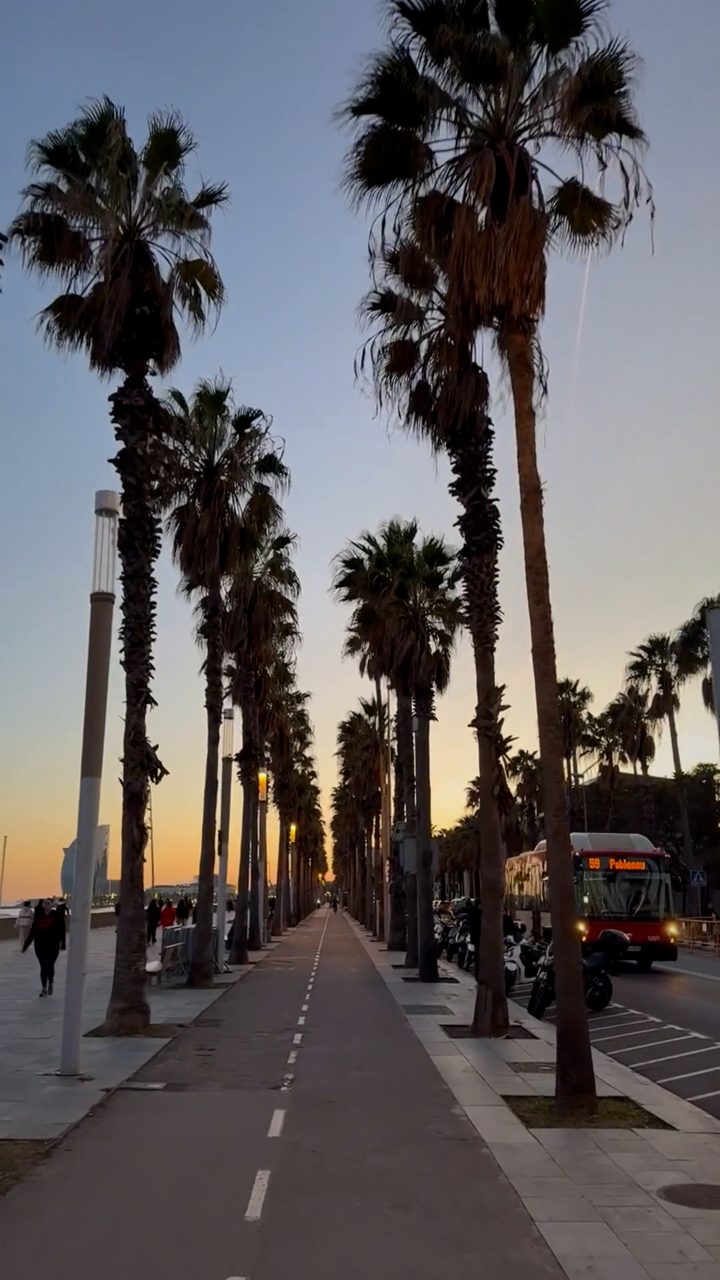 BEFORE
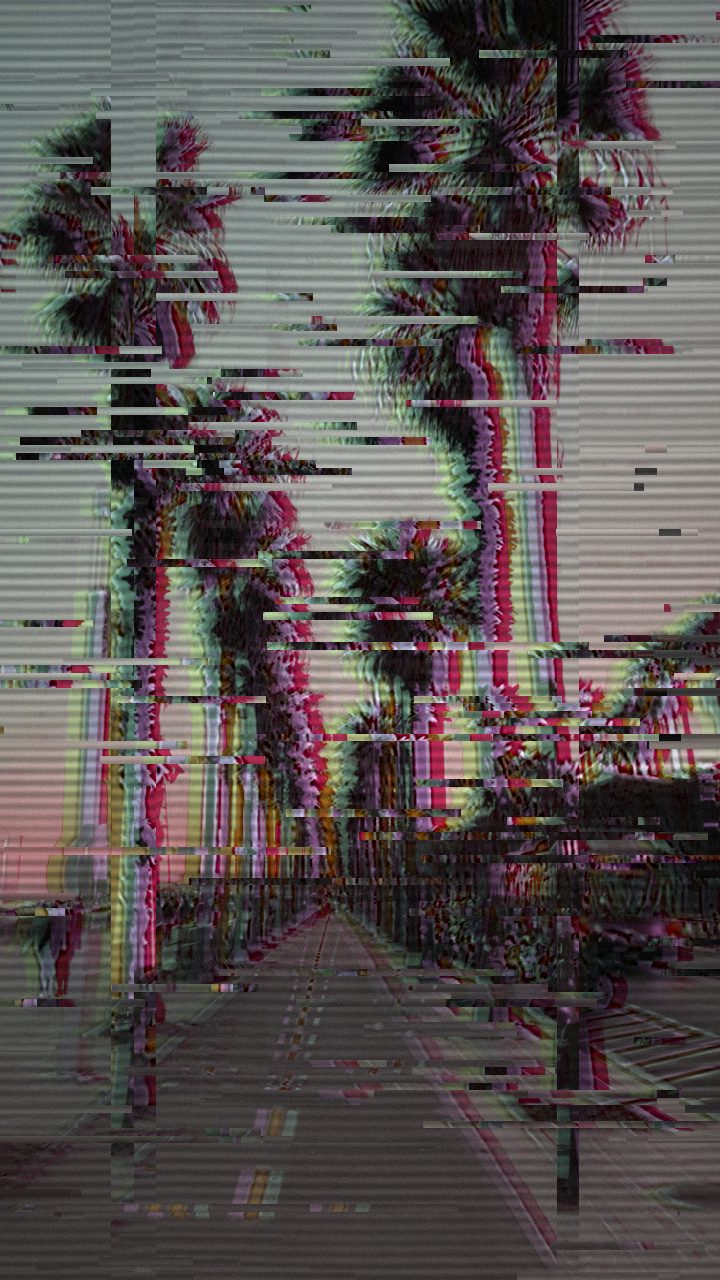 AFTER
AFTERWhy this look works
The atmospheric alchemy of this look relies on bending the visible color spectrum while elevating saturation just enough to radiate without collapsing into harsh digital clipping. Hue Shift and Color Boost do the heavy lifting here, pushing standard blues and golden-hour oranges into synthetic lilac, cyan, and rose waters. A restrained layer of Sepia acts as the unifying binder, cutting the sterile edge of digital capture to mimic aged magnetic tape emulsions.
Separation and Structural Drift
To recreate the physical sensation of viewing an uncalibrated cathode-ray tube, RGB Split pulls the color channels apart across contrasting edges. This chromatic fringe turns sharp outlines into glowing, prism-like borders. Horizontal Wave and Vertical Shift introduce a gentle mechanical drift, emulating an aging VHS playback deck where tape tension fluctuates across the spinning video drum.
Balance is critical to maintaining the dreamy chillwave vibe. If you push Chaos or Glitch Width too aggressively, the soothing suburban reverie fractures into an abrasive digital shred. Similarly, keeping Datamosh faint gives frames just enough ghosted motion carryover without turning slow camera pans into incomprehensible visual sludge.
The recipe
Start from the Y2K preset, then set:
| Retro (era) | 1994 |
| Strength (master) | 42 |
| Glitch Rate | 22 |
| Glitch Width | 38 |
| Block Size | 24 |
| Chaos | 24 |
| Datamosh (trail) | 10 |
| Horizontal Wave | 18 |
| Vertical Wave | 8 |
| Vertical Shift | 17 |
| RGB Split | 66 |
| Hue Shift | 78 |
| Color Boost | 60 |
| Sepia | 20 |
| Noise | 14 |
| Scanlines | 48 |
| Flicker | 8 |
Everything else stays at its default — tweak it, then copy your own look as JSON or a link from inside the editor to share it.
What footage suits it
To capture that authentic mall-at-midnight resonance, feed the filter source video that already embraces deliberate negative space and ambient luminance:
- Golden hour and twilight horizons: Skyscapes, coastal drives, and palm silhouettes against glowing skies yield lush pastel gradients when the chrominance shifts.
- Suburban commercial architecture: Empty escalators, neon food court signs, glass atrium ceilings, and vacant parking lots evoke quintessential nostalgic escapism.
- Slow, gliding camera moves: Steady pans, slow tracking shots, and floating gimbal glides let the subtle line waves settle beautifully without disorienting the viewer.
- High-contrast lighting accents: Backlit subjects or glowing city lights provide clean contrast edges where chromatic separation can bloom.
Avoid frantic handheld camera shakes or heavily desaturated, flat grey scenes, which turn muddy under heavy color shifts.
Common mistakes
- The image becomes blindingly radioactive magenta: Lower Color Boost or roll back Hue Shift until highlights settle into soft lilac rather than neon burn.
- Silhouettes tear apart into jagged digital spikes: Reduce Chaos and Glitch Width so the displacement remains a silky analog ripple instead of a sharp electronic freeze.
- Everything turns into an unrecognizable blurry smear: Pull back Datamosh to preserve silhouette definition across moving subjects.
When to use it
Because of its lush color palette and relaxing drift, this recipe works across chill aesthetic projects:
- Chillwave and synthpop background loops: Seamless visual loops for lofi music tracks, ambient streams, and DJ backdrops.
- Aesthetic social headers: Dreamy banners for SoundCloud, YouTube, or Discord that communicate retro nostalgia immediately.
- Vaporwave lyric videos and shorts: Atmospheric short-form cutaways, mood-establishing b-roll, and TikTok aesthetic montages.
- Retro brand bumpers: Stylized splash screens and title cards bathed in dreamy mall-chic aesthetics.
Jump into the editor to build your twilight aesthetic in real time. For a deeper look into the composition mechanics and comparative workflows behind this mood, explore our companion breakdown on the Vaporwave Sunset Look Recipe for Aesthetic Video & Edits. If your footage feels slightly too aggressive, simply back off Strength (master) by a few ticks to let the original footage breathe through.
Try it now — add this look to your own clip, free and in your browser.
Open the editor →FAQ
How do I keep faces from looking unnatural under the Vaporwave Sunset grade?
Dial Hue Shift slightly back toward natural skin tones and ease Color Boost down until faces regain warmth without losing the dreamy lilac background wash.
Why does the horizontal wave look choppy rather than silky?
Lower your Chaos slider and soften Glitch Rate so the scanlines ripple in continuous, gentle undulating ribbons rather than erratic bursts.
Can I use this look on static graphic design banners and album art?
Yes, the color grading, scanlines, and chromatic splitting create an evocative still image that looks like a paused frame from a 1990s broadcast.